
Curious? Download the app here!
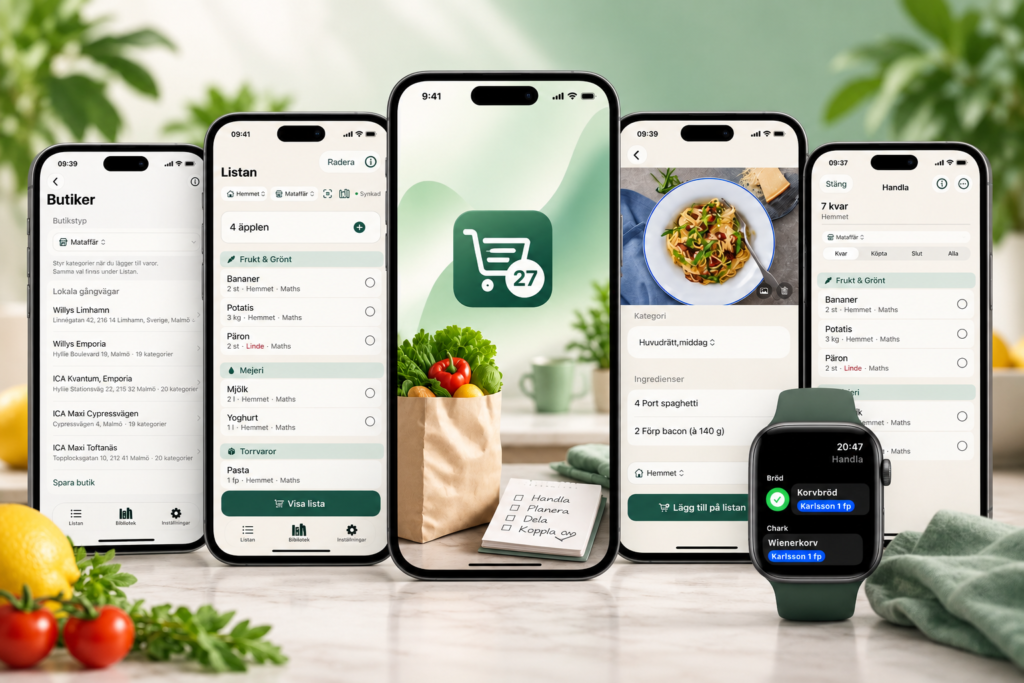
Your shopping list. Your household. An easier everyday life.
Listan 2027 makes it easier to plan, share, and complete the week’s shopping.
Create shopping lists, collaborate with your family, organize items by store, and get better control over your shopping — right on your iPhone.
Everything you need for your next shopping trip
One list for the whole household
Create a shared shopping list and keep the whole household in sync.
Everyone can add items, edit the list, and check off what has already been bought.
Shop smarter
When it’s time to shop, you get a clear overview of what needs to be bought.
Organize your items by the store’s departments and walking order so you can shop more efficiently.
Your items stay with you
The list doesn’t learn by itself — but it remembers what you’ve already added.
Previous items, categories, and information can be reused when you create your next shopping list.
That makes it easy to quickly build a new list.
From receipt to control
Scan the receipt
With Listan’s receipt feature, you can photograph a receipt and let the app read the information.
The OCR technology identifies the information on the receipt and makes it easier to save and manage your purchases.
Split a purchase between households
Do you shop for more than one household?
Listan can help you split a receipt between different households when the same purchase contains items for several people or families.
Recipes become shopping
From recipe to shopping list
Find a recipe and turn the ingredients into a shopping list.
With Listan, recipes and shopping can be linked so you don’t have to manually type out the ingredients.
Save your favorites and build your own library for future meals.
Shop your way
Stores
Save your favorite stores and customize how items should be displayed.
Walking order
Create a custom walking order for a store and let Listan present the shopping items in the order you move through the store.
Categories
Your items can be organized by categories so the list is easy to overview.
How Listan works
01 — Create the list
Add what you need to buy.
02 — Share with the household
Keep the shopping list synchronized so everyone can see the same information.
03 — Go shopping
Open the list and check off items as they go into the cart.
04 — Save the purchase
When you’re done, the purchase can be saved and supplemented with a receipt.
05 — Start over
The next shopping trip is faster because your previous items, stores, and settings remain.
Listan 2027+
More control. More possibilities.
For those who want to get even more out of Listan, there is Listan 2027+ with additional features and possibilities.
Listan 2027+
- Multiple households
- Receipt management
- OCR
- Recipes
- Stores
- Walking order
- EAN scanning
- Apple Watch
- History and archive
Built for iPhone
Listan 2027 is developed for the Apple platform and built with modern iOS technologies.
Your lists and household data can be synchronized via iCloud so the information is there where you need it.
Your data should be yours
Listan is developed with a focus on privacy and as local and secure handling of information as possible.
Your next shopping trip starts here
Do away with loose notes, messages, and lists that disappear.
Gather your shopping in one place and make the next trip a little easier.
Listan 2027
Plan. Shop. Done.
Download on the App Store
Questions and Answers
What is Listan 2027?
Listan 2027 is a modern shopping list app for iPhone, iPad, and Apple Watch. You can easily create and manage shopping lists, add items, and keep track of your shopping directly on your phone.
Which devices does Listan 2027 work on?
Listan 2027 is developed for the Apple ecosystem and works on compatible iPhone devices. The app also supports Apple Watch and iPad.
Is an internet connection required?
No, the basic functions of Listan can be used without an internet connection. However, some functions such as synchronization and iCloud-based features may require an internet connection.
Are my lists synchronized between my Apple devices?
Yes, Listan uses iCloud for synchronization when the feature is enabled. This allows your lists to stay updated across your compatible Apple devices.
How do I enable iCloud?
First, make sure you are signed in with the same Apple account on your Apple devices and that iCloud is enabled. If the app asks for access to iCloud, allow it.
If synchronization doesn’t work, check that iCloud is enabled and that you are using the same Apple account on the devices.
Can I use Listan without signing in?
Listan requires you to be signed in with your Apple account.
Can I use Listan on Apple Watch?
Yes. Listan 2027 supports Apple Watch so you can keep the shopping list easily accessible while shopping and simply check off your items as you pick them up.
Can I mark items as purchased?
Yes. You can mark items as purchased directly in the list. This makes it easy to see what has already been bought.
Can I edit or delete an item?
Yes. You can edit or delete items from your lists.
What happens if I accidentally delete a list?
Deleting a list cannot always be undone. Therefore, make sure you really want to delete the list before confirming.
Can I have multiple shopping lists?
Yes. You can create multiple lists and use them for different purposes, such as grocery store, building supplies, pharmacy, etc.
Are there ready-made items to choose from?
Listan is designed to make it easy to add items you often buy. Available features and suggestions may vary between different versions of the app.
Can I use Listan together with my family?
If sharing/synchronization is enabled, lists can be used on multiple compatible devices via iCloud. To see the same information, the devices need to be correctly configured for the same iCloud data.
My lists are not syncing — what do I do?
Try the following:
- Check that your internet connection is working.
- Check that you are signed in with the same Apple account.
- Check that iCloud is enabled.
- Close Listan completely and restart the app.
- Check that you are using the latest version of Listan.
- Restart your iPhone or Apple Watch if the problem persists.
If the problem continues, contact support.
I changed iPhones. Are my lists still there?
If your lists have been synchronized with iCloud, they can be restored when you use the same Apple account on the new device.
What happens to my lists if I delete the app?
Locally stored app information may be affected when the app is deleted. However, information synchronized with iCloud may remain depending on how the information was saved and synchronized.
We recommend checking that synchronization works before deleting the app.
How do I get the latest version?
At the moment, the app is only available for testing and can be installed via TestFlight. You download TestFlight and the app at this link.
Is Listan 2027 free?
Listan may include both free features and features that require a purchase or subscription. Current prices and terms are shown in the App Store.
How do in-app purchases work?
Any purchases are made through Apple’s App Store and handled by Apple. Your purchases are linked to your Apple account according to Apple’s rules for App Store purchases.
I paid but the feature is still locked
First, check that you are signed in with the same Apple account that was used for the purchase. If the app offers the feature Restore Purchases, try that.
If the problem persists, contact support and specify which feature it concerns.
Can I restore a previous purchase?
If Listan offers purchase restoration, you can use the Restore Purchases function in the app’s settings. You normally should not need to buy the same feature again if the purchase is already linked to your Apple account.
How do I contact support?
If you can’t find the answer to your question here, you can contact us via the support page. Please describe the problem as clearly as possible and specify which iPhone/Apple Watch and which version of Listan you are using.
I found a bug in the app. How do I report it?
Contact support and describe:
- What you were trying to do
- What happened
- What you expected to happen
- Which device you are using
- Which version of iOS/watchOS you are using
- Which version of Listan you are using
A screenshot can also be very helpful.
How do I send feedback or suggestions?
We gladly accept suggestions for improvements and new features. Use the contact form on the support page and please describe how you would like the feature to work.
How is my data handled?
Listan is designed to store and manage your lists securely. Information that uses Apple’s iCloud services is handled according to Apple’s terms and privacy policy.
Read our privacy policy for more information on how the app handles data.
Need more help?
If you can’t find the answer to your question, contact support and we’ll help you as soon as possible.
Support
Do you have questions, problems, or suggestions?
Visit our support page or contact us and we’ll help you.

 Ask a Genius