
Keep your computer awake and take control of your activity
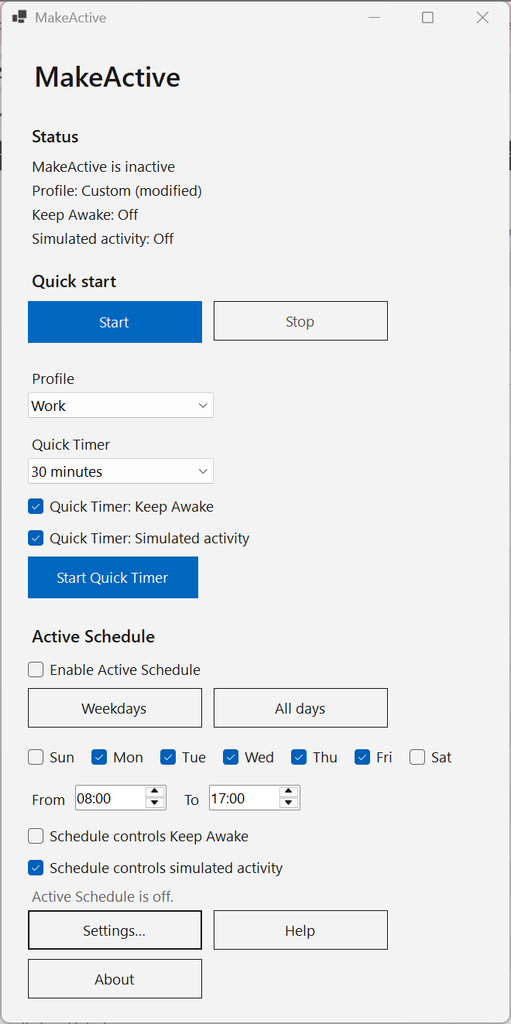
MakeActive is a lightweight Windows program that helps you control your computer’s activity, prevent unwanted sleep mode, and automate your work routine. With simple settings, scheduling, and quick access via the Windows system tray, you can tailor your computer’s behavior to your needs.
Features
Keep your computer awake
Prevent your computer from automatically going to sleep while you work on important tasks. MakeActive is useful for long downloads, backups, file transfers, software builds, presentations, and other time-consuming operations.
Keep Teams activity going
MakeActive can simulate user activity to help keep your presence status active in Microsoft Teams while you carry out manual work tasks that do not involve continuous use of the keyboard or mouse, while still wanting to remain available in Teams.
Teams controls its own presence status, so simulated activity does not guarantee that the status will always remain Available. This feature should be used in accordance with workplace rules and guidelines.
Schedule activity
Set a start time, end time, and which weekdays MakeActive should be active. The program can automatically start and stop the features you choose according to your schedule.
This is practical if you want certain features to be active during the workday without having to start and stop them manually.
Quick timer
Need to keep your computer awake for a limited time? Activate MakeActive with a quick timer, such as 30 minutes, one hour, or two hours. When the time is up, the selected functions stop automatically.
Quick access via the system tray
Manage MakeActive directly from the Windows system tray without needing to keep the program’s main window open. Check the current status, start or stop features, activate a timer, and manage scheduling with just a few clicks.
Automatic startup with Windows
Set MakeActive so the program starts automatically when you log in to Windows. That way, the features are available without you having to start the program manually each time.
Activity profiles
Choose a profile that fits your task. With the Work profile, you can keep your computer awake and configure user activity according to your needs. Presentation helps you prevent automatic sleep during presentations and meetings. Download is intended for downloads, backups, and other long-running operations. The profiles can be customized to your own preferences.
Who is MakeActive for?
MakeActive is designed for anyone who wants better control over their computer’s activity.
The program is suitable for office workers who use Microsoft Teams and switch between digital and manual work tasks. It is also useful for programmers running time-consuming builds and tests, users transferring large files or performing backups, and people working with video rendering and export.
Anyone giving presentations or wanting to automate when the computer should be kept awake can also benefit from MakeActive.
Simple, smooth, and practical
MakeActive combines activity control, scheduling, timers, and quick access in a single Windows program. Instead of repeatedly changing power settings or manually starting and stopping features, you can adapt MakeActive to your workflow.
Download MakeActive today
Want to avoid unwanted sleep mode, automate your active periods, and get better control over your computer’s activity? Try MakeActive and discover how easy it can be to adapt your computer to your needs.
Download MakeActive for your Windows computer here.
MakeActive – Stay active. Stay in control. Free to use.

 Ask a Genius